# 4.egg
# 1.请求参数获取 ctx.query/ctx.params/ctx.request.body(post 请求)
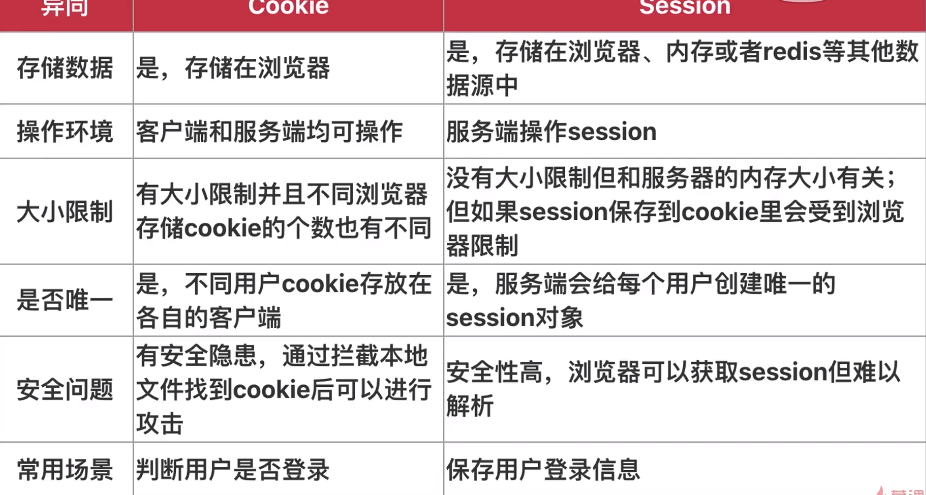
# 2. cookie 与 session
# 3. 浏览器刷新
location.reload()/router.go(0),后一种为在 vue 中的写法。
# 4. egg 扩展(在 app 目录下新建 extend 文件夹)
request 拓展方法中的 this 指向 request
response 拓展方法中的 this 指向 response
context 拓展方法中的 this 指向它本身,即通过后面的 ctx 访问
application 拓展方法中的 this 指向项目根目录中的一些信息,如(baseDir,env,name)等
application 扩展属性要在属性前面添加get
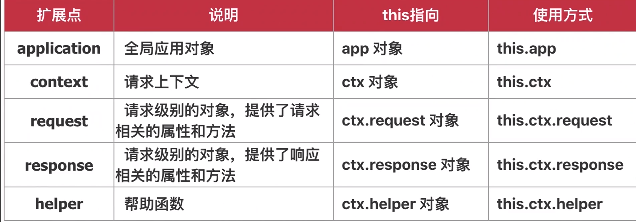
helper 上面自带的escape可以帮助过滤输入的 html 标签,防止 xss 攻击
const result = await ctx.service.user.editUser({
  ...params,
  updateTime: ctx.helper.time(),
  // 防xss攻击
  sign: ctx.helper.escape(params.sign),
})
# 5. egg 添加插件步骤
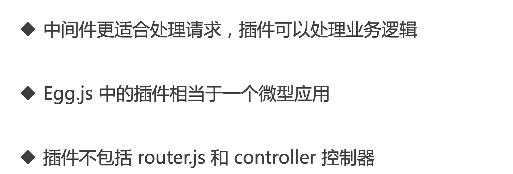
- 在项目根目录(与 app 同级)建 lib 文件夹,目录层级如下
lib/
└── plugin
└── egg-auth
└── app
├── middleware
│   └── auth.js
└── package.json
- config 文件夹下
config.js添加对应插件
auth: {
  enable: true,
    path: path.join(__dirname, '../lib/plugin/egg-auth'),
  }
- config 文件夹下
config.default.js添加对应插件配置参数
config.auth = {
  exclude: ['/newResponse'],
}
- 在项目的
app.js中把插件 push 进去
module.exports = app => {
  const store = {}
  app.config.coreMiddleware.push('auth')
}
- 插件代码修改后需重启服务才能生效。
# 6.egg 中的定时任务(上报应用状态、从远程接口更新数据、定时处理文件,如过期日志文件等)
在 app 目录下新建
schedule目录,自动执行该目录下的代码定时任务依赖
Subscription
const Subscription = require('egg').Subscription

class getInfo extends Subscription {
  static get schedule() {
    return {
      // interval单位为ms,type值为all/worker,corn
      // interval: 3000,
      corn: '*/3 * * * * *',
      type: 'worker',
    }
  }
  async subscribe() {
    console.log(new Date())
  }
}

module.exports = getInfo