# 1.浏览器输入URL后HTTP请求返回的完整过程
1.浏览器输入url后http请求返回完整过程。
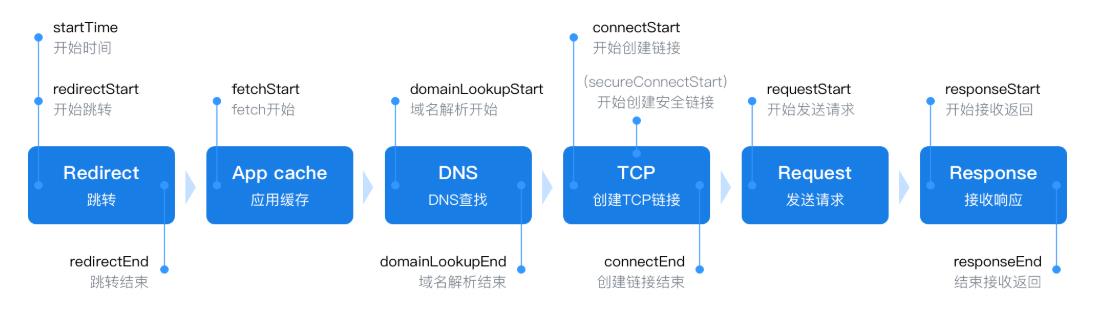
- 5层网络模型
应用层(http) 传输层(tcp/ip) 网络层 数据链路层 物理层
3.跨域设置
res.writeHead(200,{ 'Access-Control-Allow-Origin':'*' })
4.跨域
跨域默认允许的请求方式 GET POST HEAD
跨域默认允许的Content-Type:text/plain 、multipart/form-data、application/x-www-form-urlencoded
其他的需要发送预请求。预请求设置如下。
http.createServer((req,res)=>{
  res.writeHead(200,{
    'Access-Control-Allow-Origin':'*',
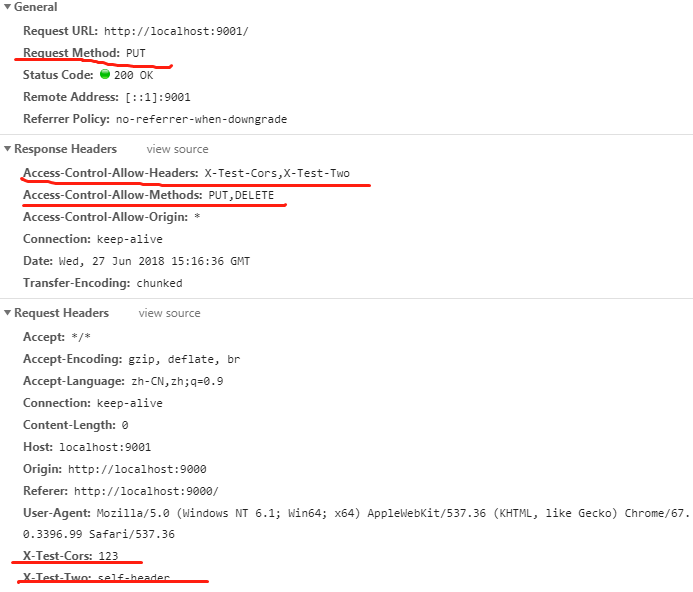
    'Access-Control-Allow-Headers':'X-Test-Cors,X-Test-Two', // 服务端设置允许的自定义请求头
    'Access-Control-Allow-Methods':'PUT,DELETE',// 服务端设置需要发送预请求的请求method
    'Access-Control-Max-Age':'1000', // 在该时间段内不用重新发送预请求,单位为秒(s)
  })
  res.end('126666663')
}).listen(httpPort,()=>{ console.log('Server listening on http://localhost:%s',httpPort) })
请求如下:
fetch('http://localhost:9001',{
  method:'PUT',
  headers:{
    'X-TEST-Cors':'123',
    'X-TEST-Two':'self-header',
  }
})
浏览器查看返回结果:
5.Content-Type':'text/plain;charset=utf-8' 以字符串的形式传输。
6..查看浏览器dns缓存
chrome://net-internals/#dns
7.查看本地host文件
C:\Windows\System32\drivers\etc